

 [](https://gitcode.com/RockChinQ/LangBot)
项目主页 |
部署文档 |
插件介绍 |
提交插件
[](https://gitcode.com/RockChinQ/LangBot)
项目主页 |
部署文档 |
插件介绍 |
提交插件
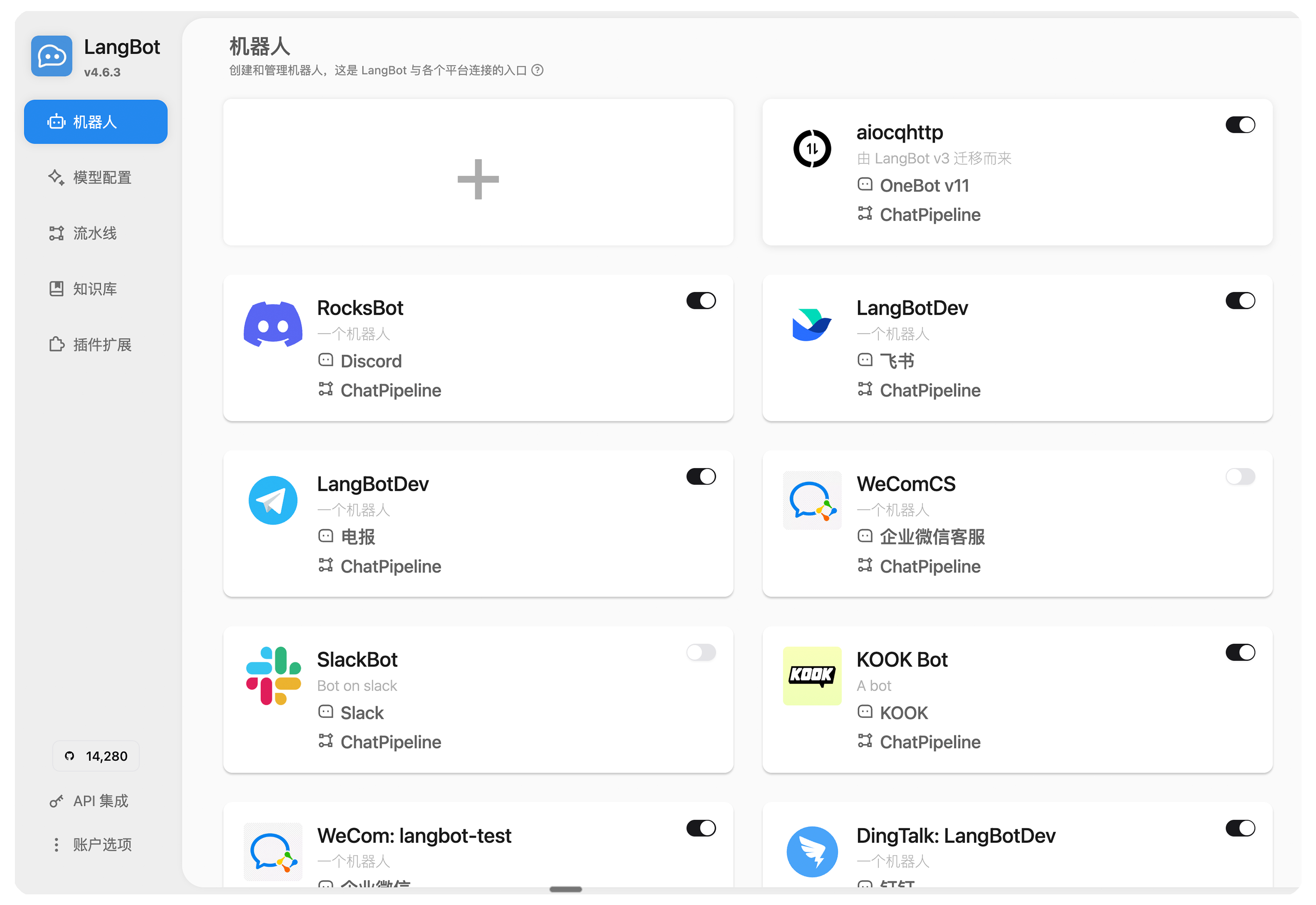 - 💬 大模型对话、Agent:支持多种大模型,适配群聊和私聊;具有多轮对话、工具调用、多模态、流式输出能力,自带 RAG(知识库)实现,并深度适配 [Dify](https://dify.ai)、[Coze](https://coze.com)、[n8n](https://n8n.io)等 LLMOps 平台。
- 🤖 多平台支持:目前支持 QQ、QQ频道、企业微信、个人微信、飞书、Discord、Telegram、KOOK、Slack、LINE 等平台。
- 🛠️ 高稳定性、功能完备:原生支持访问控制、限速、敏感词过滤等机制;配置简单,支持多种部署方式。支持多流水线配置,不同机器人用于不同应用场景。
- 🧩 插件扩展、活跃社区:高稳定性、高安全性的生产级插件系统,支持事件驱动、组件扩展等插件机制;适配 Anthropic [MCP 协议](https://modelcontextprotocol.io/);目前已有数百个插件。
- 😻 Web 管理面板:支持通过浏览器管理 LangBot 实例,不再需要手动编写配置文件。
详细规格特性请访问[文档](https://docs.langbot.app/zh/insight/features.html)。
或访问 demo 环境:https://demo.langbot.dev/
- 登录信息:邮箱:`demo@langbot.app` 密码:`langbot123456`
- 注意:仅展示 WebUI 效果,公开环境,请不要在其中填入您的任何敏感信息。
### 消息平台
| 平台 | 状态 | 备注 |
| --- | --- | --- |
| QQ 个人号 | ✅ | QQ 个人号私聊、群聊 |
| QQ 官方机器人 | ✅ | QQ 官方机器人,支持频道、私聊、群聊 |
| 企业微信 | ✅ | |
| 企微对外客服 | ✅ | |
| 企微智能机器人 | ✅ | |
| 个人微信 | ✅ | |
| 微信公众号 | ✅ | |
| 飞书 | ✅ | |
| 钉钉 | ✅ | |
| KOOK | ✅ | |
| Discord | ✅ | |
| Telegram | ✅ | |
| Slack | ✅ | |
| LINE | ✅ | |
### 大模型能力
| 模型 | 状态 | 备注 |
| --- | --- | --- |
| [OpenAI](https://platform.openai.com/) | ✅ | 可接入任何 OpenAI 接口格式模型 |
| [DeepSeek](https://www.deepseek.com/) | ✅ | |
| [Moonshot](https://www.moonshot.cn/) | ✅ | |
| [Anthropic](https://www.anthropic.com/) | ✅ | |
| [xAI](https://x.ai/) | ✅ | |
| [智谱AI](https://open.bigmodel.cn/) | ✅ | |
| [胜算云](https://www.shengsuanyun.com/?from=CH_KYIPP758) | ✅ | 全球大模型都可调用(友情推荐) |
| [优云智算](https://www.compshare.cn/?ytag=GPU_YY-gh_langbot) | ✅ | 大模型和 GPU 资源平台 |
| [PPIO](https://ppinfra.com/user/register?invited_by=QJKFYD&utm_source=github_langbot) | ✅ | 大模型和 GPU 资源平台 |
| [接口 AI](https://jiekou.ai/) | ✅ | 大模型聚合平台,专注全球大模型接入 |
| [302.AI](https://share.302.ai/SuTG99) | ✅ | 大模型聚合平台 |
| [Google Gemini](https://aistudio.google.com/prompts/new_chat) | ✅ | |
| [Dify](https://dify.ai) | ✅ | LLMOps 平台 |
| [Ollama](https://ollama.com/) | ✅ | 本地大模型运行平台 |
| [LMStudio](https://lmstudio.ai/) | ✅ | 本地大模型运行平台 |
| [GiteeAI](https://ai.gitee.com/) | ✅ | 大模型接口聚合平台 |
| [SiliconFlow](https://siliconflow.cn/) | ✅ | 大模型聚合平台 |
| [小马算力](https://www.tokenpony.cn/453z1) | ✅ | 大模型聚合平台 |
| [阿里云百炼](https://bailian.console.aliyun.com/) | ✅ | 大模型聚合平台, LLMOps 平台 |
| [火山方舟](https://console.volcengine.com/ark/region:ark+cn-beijing/model?vendor=Bytedance&view=LIST_VIEW) | ✅ | 大模型聚合平台, LLMOps 平台 |
| [ModelScope](https://modelscope.cn/docs/model-service/API-Inference/intro) | ✅ | 大模型聚合平台 |
| [MCP](https://modelcontextprotocol.io/) | ✅ | 支持通过 MCP 协议获取工具 |
| [百宝箱Tbox](https://www.tbox.cn/open) | ✅ | 蚂蚁百宝箱智能体平台,每月免费10亿大模型Token |
### TTS
| 平台/模型 | 备注 |
| --- | --- |
| [FishAudio](https://fish.audio/zh-CN/discovery/) | [插件](https://github.com/the-lazy-me/NewChatVoice) |
| [海豚 AI](https://www.ttson.cn/?source=thelazy) | [插件](https://github.com/the-lazy-me/NewChatVoice) |
| [AzureTTS](https://portal.azure.com/) | [插件](https://github.com/Ingnaryk/LangBot_AzureTTS) |
### 文生图
| 平台/模型 | 备注 |
| --- | --- |
| 阿里云百炼 | [插件](https://github.com/Thetail001/LangBot_BailianTextToImagePlugin)
## 😘 社区贡献
感谢以下[代码贡献者](https://github.com/langbot-app/LangBot/graphs/contributors)和社区里其他成员对 LangBot 的贡献:
- 💬 大模型对话、Agent:支持多种大模型,适配群聊和私聊;具有多轮对话、工具调用、多模态、流式输出能力,自带 RAG(知识库)实现,并深度适配 [Dify](https://dify.ai)、[Coze](https://coze.com)、[n8n](https://n8n.io)等 LLMOps 平台。
- 🤖 多平台支持:目前支持 QQ、QQ频道、企业微信、个人微信、飞书、Discord、Telegram、KOOK、Slack、LINE 等平台。
- 🛠️ 高稳定性、功能完备:原生支持访问控制、限速、敏感词过滤等机制;配置简单,支持多种部署方式。支持多流水线配置,不同机器人用于不同应用场景。
- 🧩 插件扩展、活跃社区:高稳定性、高安全性的生产级插件系统,支持事件驱动、组件扩展等插件机制;适配 Anthropic [MCP 协议](https://modelcontextprotocol.io/);目前已有数百个插件。
- 😻 Web 管理面板:支持通过浏览器管理 LangBot 实例,不再需要手动编写配置文件。
详细规格特性请访问[文档](https://docs.langbot.app/zh/insight/features.html)。
或访问 demo 环境:https://demo.langbot.dev/
- 登录信息:邮箱:`demo@langbot.app` 密码:`langbot123456`
- 注意:仅展示 WebUI 效果,公开环境,请不要在其中填入您的任何敏感信息。
### 消息平台
| 平台 | 状态 | 备注 |
| --- | --- | --- |
| QQ 个人号 | ✅ | QQ 个人号私聊、群聊 |
| QQ 官方机器人 | ✅ | QQ 官方机器人,支持频道、私聊、群聊 |
| 企业微信 | ✅ | |
| 企微对外客服 | ✅ | |
| 企微智能机器人 | ✅ | |
| 个人微信 | ✅ | |
| 微信公众号 | ✅ | |
| 飞书 | ✅ | |
| 钉钉 | ✅ | |
| KOOK | ✅ | |
| Discord | ✅ | |
| Telegram | ✅ | |
| Slack | ✅ | |
| LINE | ✅ | |
### 大模型能力
| 模型 | 状态 | 备注 |
| --- | --- | --- |
| [OpenAI](https://platform.openai.com/) | ✅ | 可接入任何 OpenAI 接口格式模型 |
| [DeepSeek](https://www.deepseek.com/) | ✅ | |
| [Moonshot](https://www.moonshot.cn/) | ✅ | |
| [Anthropic](https://www.anthropic.com/) | ✅ | |
| [xAI](https://x.ai/) | ✅ | |
| [智谱AI](https://open.bigmodel.cn/) | ✅ | |
| [胜算云](https://www.shengsuanyun.com/?from=CH_KYIPP758) | ✅ | 全球大模型都可调用(友情推荐) |
| [优云智算](https://www.compshare.cn/?ytag=GPU_YY-gh_langbot) | ✅ | 大模型和 GPU 资源平台 |
| [PPIO](https://ppinfra.com/user/register?invited_by=QJKFYD&utm_source=github_langbot) | ✅ | 大模型和 GPU 资源平台 |
| [接口 AI](https://jiekou.ai/) | ✅ | 大模型聚合平台,专注全球大模型接入 |
| [302.AI](https://share.302.ai/SuTG99) | ✅ | 大模型聚合平台 |
| [Google Gemini](https://aistudio.google.com/prompts/new_chat) | ✅ | |
| [Dify](https://dify.ai) | ✅ | LLMOps 平台 |
| [Ollama](https://ollama.com/) | ✅ | 本地大模型运行平台 |
| [LMStudio](https://lmstudio.ai/) | ✅ | 本地大模型运行平台 |
| [GiteeAI](https://ai.gitee.com/) | ✅ | 大模型接口聚合平台 |
| [SiliconFlow](https://siliconflow.cn/) | ✅ | 大模型聚合平台 |
| [小马算力](https://www.tokenpony.cn/453z1) | ✅ | 大模型聚合平台 |
| [阿里云百炼](https://bailian.console.aliyun.com/) | ✅ | 大模型聚合平台, LLMOps 平台 |
| [火山方舟](https://console.volcengine.com/ark/region:ark+cn-beijing/model?vendor=Bytedance&view=LIST_VIEW) | ✅ | 大模型聚合平台, LLMOps 平台 |
| [ModelScope](https://modelscope.cn/docs/model-service/API-Inference/intro) | ✅ | 大模型聚合平台 |
| [MCP](https://modelcontextprotocol.io/) | ✅ | 支持通过 MCP 协议获取工具 |
| [百宝箱Tbox](https://www.tbox.cn/open) | ✅ | 蚂蚁百宝箱智能体平台,每月免费10亿大模型Token |
### TTS
| 平台/模型 | 备注 |
| --- | --- |
| [FishAudio](https://fish.audio/zh-CN/discovery/) | [插件](https://github.com/the-lazy-me/NewChatVoice) |
| [海豚 AI](https://www.ttson.cn/?source=thelazy) | [插件](https://github.com/the-lazy-me/NewChatVoice) |
| [AzureTTS](https://portal.azure.com/) | [插件](https://github.com/Ingnaryk/LangBot_AzureTTS) |
### 文生图
| 平台/模型 | 备注 |
| --- | --- |
| 阿里云百炼 | [插件](https://github.com/Thetail001/LangBot_BailianTextToImagePlugin)
## 😘 社区贡献
感谢以下[代码贡献者](https://github.com/langbot-app/LangBot/graphs/contributors)和社区里其他成员对 LangBot 的贡献: