
LangBot

LangBot - Production-grade IM bot made easy. | Product Hunt

AI 에이전트 IM 봇 구축을 위한 프로덕션 등급 플랫폼.

Slack, Discord, Telegram, WeChat 등에 AI 봇을 빠르게 구축, 디버그 및 배포.

[English](README.md) / [简体中文](README_CN.md) / [繁體中文](README_TW.md) / [日本語](README_JP.md) / [Español](README_ES.md) / [Français](README_FR.md) / 한국어 / [Русский](README_RU.md) / [Tiếng Việt](README_VI.md) [![Discord](https://img.shields.io/discord/1335141740050649118?logo=discord&labelColor=%20%235462eb&logoColor=%20%23f5f5f5&color=%20%235462eb)](https://discord.gg/wdNEHETs87) [![Ask DeepWiki](https://deepwiki.com/badge.svg)](https://deepwiki.com/langbot-app/LangBot) [![GitHub release (latest by date)](https://img.shields.io/github/v/release/langbot-app/LangBot)](https://github.com/langbot-app/LangBot/releases/latest) python [![GitHub stars](https://img.shields.io/github/stars/langbot-app/LangBot?style=social)](https://github.com/langbot-app/LangBot/stargazers) 기능문서API플러그인 마켓로드맵

--- ## LangBot이란? LangBot은 AI 기반 인스턴트 메시징 봇을 구축하기 위한 **오픈소스 프로덕션 등급 플랫폼**입니다. 대규모 언어 모델(LLM)을 모든 채팅 플랫폼에 연결하여 대화, 작업 실행, 기존 워크플로우와의 통합이 가능한 지능형 에이전트를 만들 수 있습니다.

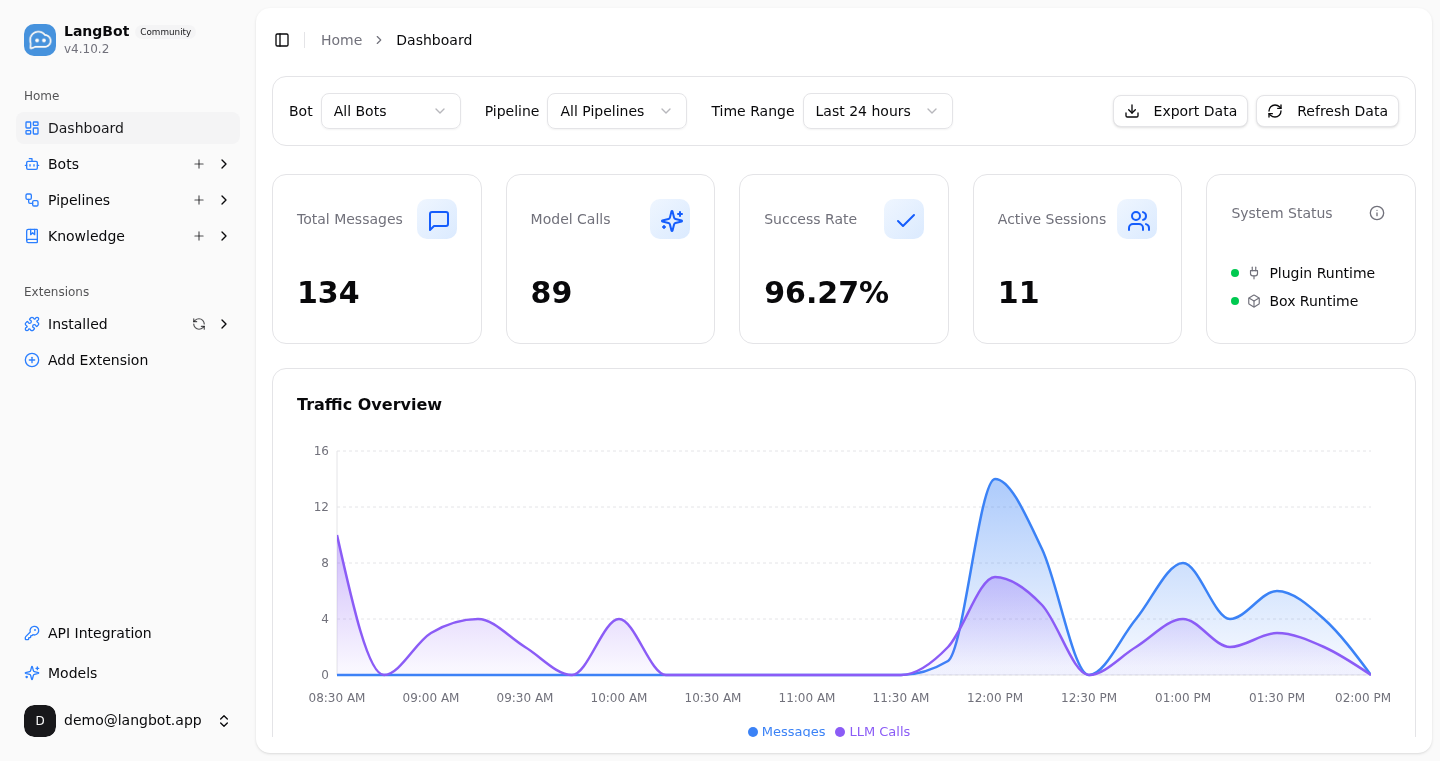
LangBot 웹 관리 패널 대시보드 — 메시지 양, 모델 호출, 성공률, 활성 세션 실시간 모니터링

### 핵심 기능 - **AI 대화 및 에이전트** — 멀티턴 대화, 도구 호출, 멀티모달 지원, 스트리밍 출력. 내장 RAG(지식 베이스)와 [Dify](https://dify.ai), [Coze](https://coze.com), [n8n](https://n8n.io), [Langflow](https://langflow.org), [Deerflow](https://deerflow.tech), [Weknora](https://weknora.weixin.qq.com) 심층 통합. - **유니버설 IM 플랫폼 지원** — 단일 코드베이스로 Discord, Telegram, Slack, LINE, QQ, WeChat, WeCom, Lark, DingTalk, KOOK 지원. - **프로덕션 레디** — 접근 제어, 속도 제한, 민감어 필터링, 종합 모니터링 및 예외 처리. 기업 환경에서 검증됨. - **플러그인 생태계** — 수백 개의 플러그인, 이벤트 기반 아키텍처, 컴포넌트 확장, [MCP 프로토콜](https://modelcontextprotocol.io/) 지원. - **웹 관리 패널** — 직관적인 브라우저 인터페이스로 봇을 구성, 관리 및 모니터링. YAML 편집 불필요. - **멀티 파이프라인 아키텍처** — 다양한 시나리오에 맞는 다양한 봇 구성, 종합 모니터링 및 예외 처리. [→ 모든 기능 자세히 보기](https://link.langbot.app/en/docs/features) 📍 실전 가이드: [5분 만에 멀티 플랫폼 AI 봇 배포하기](https://blog.langbot.app/en/blog/deploy-ai-bot-in-5-minutes/), [DeepSeek를 WeChat, Discord, Telegram에 연결하기](https://blog.langbot.app/en/blog/connect-deepseek-to-wechat/), [Dify Agent를 Discord, Telegram, Slack에서 실행하기](https://blog.langbot.app/en/blog/dify-agent-discord-telegram-slack/), [n8n 기반 챗봇 만들기](https://blog.langbot.app/en/blog/n8n-multi-platform-ai-chatbot/). --- ## 빠른 시작 ### ☁️ LangBot Cloud (추천) **[LangBot Cloud](https://space.langbot.app/cloud)** — 배포 없이 바로 사용. ### 원라인 실행 ```bash uvx langbot ``` > [uv](https://docs.astral.sh/uv/getting-started/installation/) 설치 필요. http://localhost:5300 방문 — 완료. ### Docker Compose ```bash git clone https://github.com/langbot-app/LangBot cd LangBot/docker docker compose up -d ``` ### 원클릭 클라우드 배포 [![Deploy on Zeabur](https://zeabur.com/button.svg)](https://zeabur.com/en-US/templates/ZKTBDH) [![Deploy on Railway](https://railway.com/button.svg)](https://railway.app/template/yRrAyL?referralCode=vogKPF) **더 많은 옵션:** [Docker](https://link.langbot.app/en/docs/docker) · [수동 배포](https://link.langbot.app/en/docs/manual-deploy) · [BTPanel](https://link.langbot.app/en/docs/bt-panel) · [Kubernetes](https://docs.langbot.app/en/deploy/langbot/kubernetes) --- ## 지원 플랫폼 | 플랫폼 | 상태 | 비고 | |--------|------|------| | Discord | ✅ | 공식 | | Telegram | ✅ | 공식 | | Slack | ✅ | 공식 | | LINE | ✅ | 공식 | | QQ | ✅ | 개인 및 공식 API (채널, DM, 그룹) | | WeCom | ✅ | 기업 WeChat, 외부 CS, AI Bot | | WeChat | ✅ | 개인 및 공식 계정 | | Lark | ✅ | 공식 | | DingTalk | ✅ | 공식 | | KOOK | ✅ | 공식 | | Satori | ✅ | | | Email | ✅ | Matrix, Satori | | Matrix | ✅ | Signal, WhatsApp, Messenger, iMessage, Mattermost, Google Chat, IRC, XMPP, Zulip 등 여러 브리지 플랫폼 지원 | --- ## 지원 LLM 및 통합 | 제공자 | 유형 | 상태 | |--------|------|------| | [OpenAI](https://platform.openai.com/) | LLM | ✅ | | [Anthropic](https://www.anthropic.com/) | LLM | ✅ | | [DeepSeek](https://www.deepseek.com/) | LLM | ✅ | | [Google Gemini](https://aistudio.google.com/prompts/new_chat) | LLM | ✅ | | [xAI](https://x.ai/) | LLM | ✅ | | [Moonshot](https://www.moonshot.cn/) | LLM | ✅ | | [Zhipu AI](https://open.bigmodel.cn/) | LLM | ✅ | | [Ollama](https://ollama.com/) | 로컬 LLM | ✅ | | [LM Studio](https://lmstudio.ai/) | 로컬 LLM | ✅ | | [Dify](https://dify.ai) | LLMOps | ✅ | | [MCP](https://modelcontextprotocol.io/) | 프로토콜 | ✅ | | [SiliconFlow](https://siliconflow.cn/) | 게이트웨이 | ✅ | | [Aliyun Bailian](https://bailian.console.aliyun.com/) | 게이트웨이 | ✅ | | [Volc Engine Ark](https://console.volcengine.com/ark/region:ark+cn-beijing/model?vendor=Bytedance&view=LIST_VIEW) | 게이트웨이 | ✅ | | [ModelScope](https://modelscope.cn/docs/model-service/API-Inference/intro) | 게이트웨이 | ✅ | | [GiteeAI](https://ai.gitee.com/) | 게이트웨이 | ✅ | | [CompShare](https://www.compshare.cn/?ytag=GPU_YY-gh_langbot) | GPU 플랫폼 | ✅ | | [PPIO](https://ppinfra.com/user/register?invited_by=QJKFYD&utm_source=github_langbot) | GPU 플랫폼 | ✅ | | [ShengSuanYun](https://www.shengsuanyun.com/?from=CH_KYIPP758) | GPU 플랫폼 | ✅ | | [接口 AI](https://jiekou.ai/) | 게이트웨이 | ✅ | | [302.AI](https://share.302.ai/SuTG99) | 게이트웨이 | ✅ | | [Qiniu](https://www.qiniu.com/ai/agent) | 게이트웨이 | ✅ | [→ 모든 통합 보기](https://link.langbot.app/en/docs/features) --- ## 왜 LangBot인가? | 사용 사례 | LangBot 활용 방법 | |-----------|-------------------| | **고객 지원** | 지식 베이스를 활용하여 질문에 답변하는 AI 에이전트를 Slack/Discord/Telegram에 배포 | | **내부 도구** | n8n/Dify 워크플로우를 WeCom/DingTalk에 연결하여 비즈니스 프로세스 자동화 | | **커뮤니티 관리** | AI 기반 콘텐츠 필터링 및 상호작용으로 QQ/Discord 그룹 관리 | | **멀티 플랫폼** | 하나의 봇으로 모든 플랫폼 지원. 단일 대시보드에서 관리 | --- ## 라이브 데모 **지금 체험:** https://demo.langbot.dev/ - 이메일: `demo@langbot.app` - 비밀번호: `langbot123456` *참고: 공개 데모 환경입니다. 민감한 정보를 입력하지 마세요.* ## AI 에이전트를 위한 설계 🤖 LangBot은 **설계 단계부터 에이전트 친화적**입니다 —— 코딩 에이전트(Claude Code, Codex, Copilot, Cursor 등)가 일급 지원으로 LangBot을 운영·확장·배포할 수 있습니다: - **MCP 서버** —— LangBot은 내장 [Model Context Protocol](https://modelcontextprotocol.io/) 엔드포인트 `/mcp`를 제공하며, HTTP API와 동일하게 미러링되어 에이전트가 봇·파이프라인·플러그인·모델을 프로그래밍 방식으로 관리할 수 있습니다. 동일한 API 키로 인증하며(`config.yaml`에 전역 키 설정 또는 사용자 키 사용) 로그인 절차가 필요 없습니다. 웹 패널의 **API & MCP** 탭에서 설정합니다. - **저장소 내 Skills** —— [`skills/`](skills/) 디렉터리는 LangBot 작업의 **단일 진실 공급원**입니다: 플러그인 개발, 코어 개발, E2E 테스트, 배포, LangBot / LangBot Space MCP 서버 운영. 에이전트를 이 디렉터리로 안내하면 빌드 방법을 알게 됩니다. - **AGENTS.md** —— 모든 저장소에는 [`AGENTS.md`](AGENTS.md)(`CLAUDE.md`로 심볼릭 링크)가 있으며 아키텍처, 규약, 그리고 API 변경 시 MCP 서버와 skills를 동기화해야 한다는 규칙을 설명합니다. - **`llms.txt`** —— LLM을 위한 기계 판독 가능한 프로젝트 컨텍스트가 웹사이트에 게시되어 있습니다. > **클라우드 / 마켓플레이스:** [LangBot Space](https://space.langbot.app)도 MCP 서버를 제공하여 에이전트가 Personal Access Token으로 인증해 플러그인 / MCP / Skill 마켓플레이스를 검색하고 조회할 수 있습니다. --- ## 커뮤니티 [![Discord](https://img.shields.io/discord/1335141740050649118?logo=discord&label=Discord)](https://discord.gg/wdNEHETs87) - [Discord 커뮤니티](https://discord.gg/wdNEHETs87) --- ## Star 추이 [![Star History Chart](https://api.star-history.com/svg?repos=langbot-app/LangBot&type=Date)](https://star-history.com/#langbot-app/LangBot&Date) --- ## 기여자 LangBot을 더 나은 프로젝트로 만들어 주신 모든 [기여자](https://github.com/langbot-app/LangBot/graphs/contributors)분들께 감사드립니다:
